FOR TEAMS THAT RUN LOCATIONS · FREE 14-DAY TRIAL

Operations
that actually run.

Running hotels, salons, clinics, or cleaning crews across locations? SortMyTask puts the day’s work in one place: who does what, where, by when, with proof. The day runs without you chasing it.

60-day money-back guarantee · running in 15 min · keep your data forever

Built forhotelssalonscleaningfacility ops
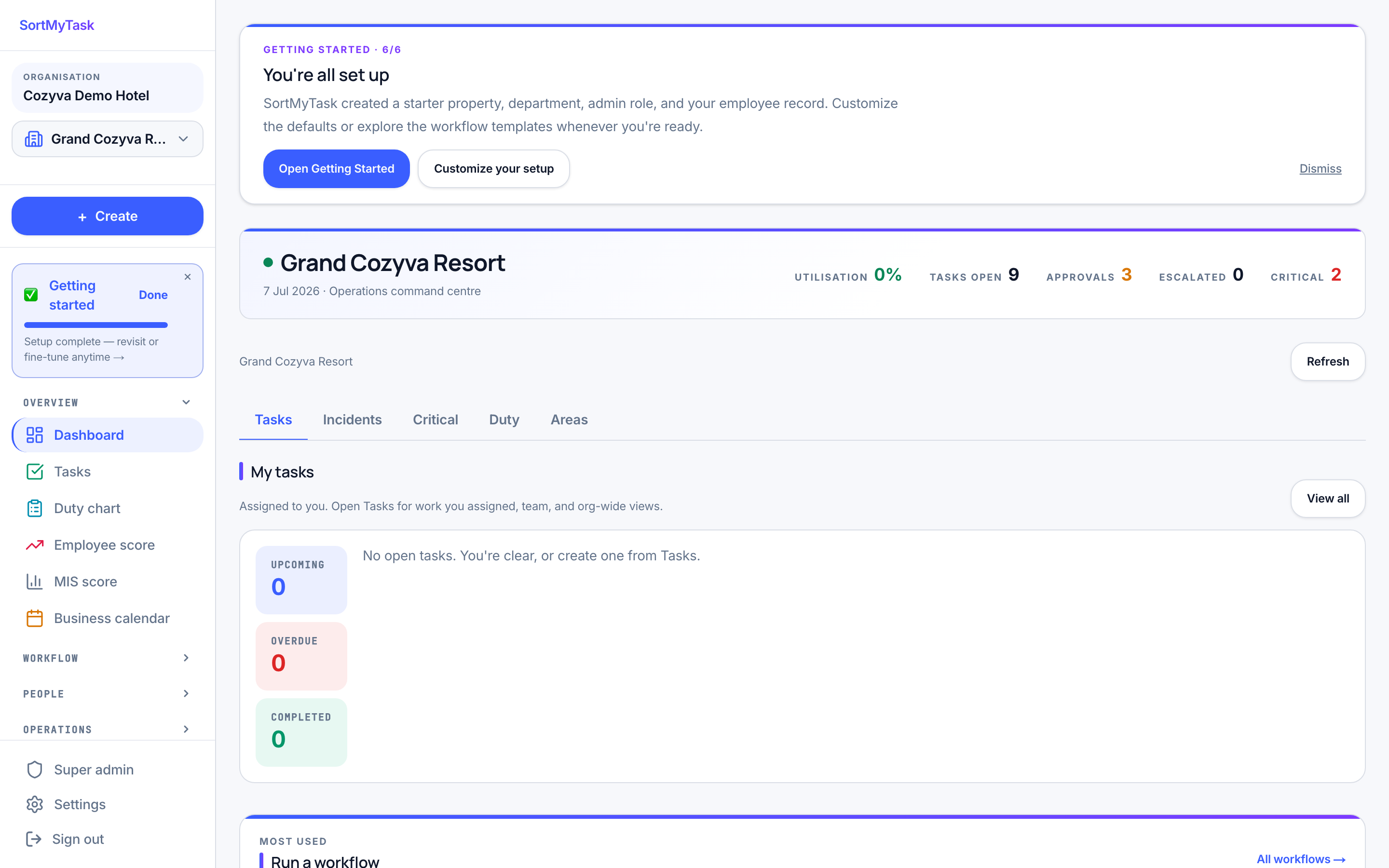
The real SortMyTask board: every location's day on one screen
5minOnboard a new property
0Spreadsheets needed
1Place the whole team checks
₹99/uPer unit, per month
Built for ops teams running
HOTELSSalon chainsCLEANINGFacility mgmtRETAILField service

What ships day one,
not in the roadmap.

Everything below is in the product right now. No waitlist, no "coming soon". Set up a location in the morning, run your first workflow by lunch. By Sunday night your first weekly scores are ready on their own.

TASKS

Tasks with approval

Work moves through honest stages: coming up, waiting for a check, done, sent back, cancelled. Supervisors approve in one tap. Photos and the checklist stay attached as proof, not buried in an email thread.

// EVERY TASK HAS A TRAIL
WORKFLOWS

Draw how work should flow

Tell it once, like you would tell a person: "when this finishes, start that. If it is a weekend, add this step." Publish it, and it runs that way every time.

// THE SIGNATURE FEATURE
DUTY

Today’s duty chart

Mark who’s on shift, by property and department, grouped by team. Present staff jump to the top when you assign or generate tasks.

// ROSTER THE DAY
SCORE

Weekly scores, done for you

Everyone’s week adds up automatically as work gets approved, and once Sunday ends the number is final. Monday’s meeting starts with the score on the screen, not with someone rebuilding the week from memory.

// MONDAY OPENS READY
CHECKLIST

Checklist masters

Write a checklist once and every future task of that type carries it. Update the master, and tomorrow’s tasks pick it up. One-off job? Adjust just that task.

// YOUR STANDARDS, EVERYWHERE
LOCATIONS

Every location, its own lane

Each location keeps its own tasks, teams, and reports. One login for you, clean separation underneath. Nothing mixes between sites.

// CLEAN SEPARATION
ACCESS

Everyone sees their part

Owners see the big picture. Supervisors see their team. Frontline staff see today’s list. Nobody wades through noise that isn’t theirs.

// NO CLUTTER, NO SNOOPING
RECORD

Everything on record

Every approval, change, and sign-off is written down: who, what, when. Disagreements end with a lookup, not an argument.

// NEVER A HE-SAID-SHE-SAID

No jargon. No complicated boards.
Just today’s work, by location.

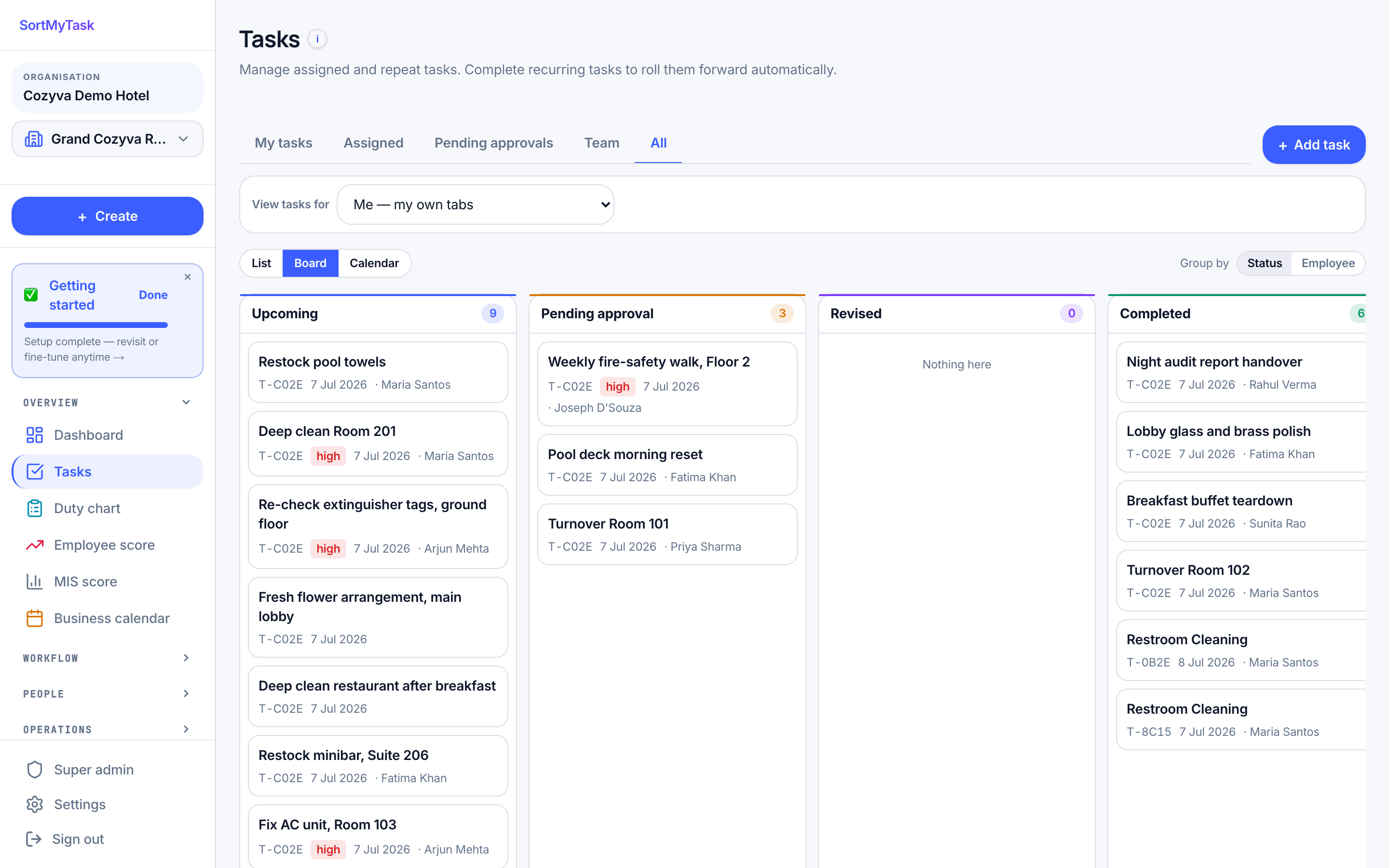
The ops board groups tasks the way the day actually goes: what’s coming up, what’s waiting on your approval, what came back, what’s done. Filter by property, department, assignee, or workflow source. List, calendar, and per-employee views one tap away.

Approval flow that lives in the taskThe supervisor approves on the card. Checklist and photos attach automatically. If something’s missing, send it back with a note. The task returns with your note, so the person knows exactly what to redo.
Checklist modes that fit realityUse a master template for SOPs, or build an ad-hoc list for a one-off. Sub-items roll up to a single complete state. Photo + reading inputs supported per item.
Auto-create from workflowsWhen a scheduled workflow fires (or a triggering task completes), tasks spawn already-assigned, already-checklisted, already-scoped to the right property and department.
The real SortMyTask board: upcoming, pending approval, and completed columns with live demo data

One workspace,
one source of truth.

Tasks know which workflow spawned them. Workflows know which property they run in. The duty chart knows who’s on shift. Scores know which weeks have closed. No more reconciling four tools at the end of every week.

Tasks

Every job has clear stages and an approval step. Photos, checklists, and notes live on the task itself, not scattered across chats.

CLEAR STAGES · PROOF/tasks

Workflows

Draw how the work should flow: schedules, conditions, follow-ups. It runs that way, every time.

DRAW IT · IT RUNS/workflows

Duty chart

Mark who’s on shift today, by location and department. The people actually in the building come first when work is handed out.

DAILY · ROSTER/duty-chart

Employee score

Everyone’s week adds up on its own and is final once Sunday ends. Monday opens with the number already settled.

WEEKLY · AUTOMATIC/employee-score

MIS score

One report across departments and locations, week by week. Ready to share with whoever asks.

ONE REPORT · SHAREABLE/mis-score

Locations & roles

Every location cleanly separated, and every person sees exactly their part: owners the big picture, frontline today’s list.

PER ROLE · PER SITE/properties

Every capability
your operation needs.

Twelve pieces that all talk to each other. Turn on the ones you need; the rest stay out of the sidebar until you ask. No tab graveyard. No "let me find that".

01

Tasks

Clear stages, an approval step, and photo + checklist proof on the card itself.

CORE/tasks
02

Workflows · visual

Draw the flow, set the conditions, publish. It runs that way every time. The signature feature.

SIGNATURE/workflows
03

Duty chart

Mark today’s on-shift staff by location. Present people come first when work is assigned.

DAILY/duty-chart
04

Checklist masters

Write standards once; every future task inherits them. Adjust one task when today’s different.

TEMPLATE/checklist-masters
05

Employee score

Weekly scores add up on their own and settle once the week ends. No manual tallying.

WEEKLY/employee-score
06

MIS score

One roll-up across departments and locations, week by week. Ready to share.

ROLLUP/mis-score
07

Properties

Every task, workflow, and score belongs to a location. Nothing mixes between sites.

SCOPE/properties
08

Departments

Teams within a location. Work routes to the right team and rolls up cleanly.

STRUCTURE/departments
09

Roles & access

Owners, ops leads, supervisors, frontline: each sees their part and nothing else.

ACCESS/roles
10

Shifts

Set who works when, if you want. The duty chart and scores pick it up.

OPTIONAL/shifts
11

Holiday calendar

Add your holidays once; schedules and weekly targets adjust on their own.

CALENDAR/holiday-calendar
❮❯
12

Everything on record

Every approval, change, and sign-off written down. Find anything later.

ON RECORD/audit-logs

One operations lead.
Four properties.

A real morning in the product, simulated. As you scroll, the screen on the left mirrors what an operations lead actually sees: approve overnight tasks, set today's duty roster, check a workflow run, catch a missed item, and let the week lock itself.

app.sortmytask.com / tasks · pending approval
9 overnight tasks waiting on your sign-off
PENDING APPROVAL · 9OVERNIGHT
T-2038Lobby reset · 05:30RM
T-2041Deep clean · west wingPR
T-2043Pool chemistry log · readingsJT
T-2044Inspect Suite 1208 · handoverDM
06:14 · WEDNESDAY

Approve the overnight.

Open Tasks · Pending approval. Nine cards waiting: checklists complete, photos attached. ↵ approves the highlighted card and the cursor advances to the next.

PENDING 9DUE TODAY 21BLOCKED 2
07:30 · DUTY CHART

Set the roster.

Open Duty chart. Mark who's in across four properties, grouped by department. One change in Delhi (PR on leave): untick, tick her cover. Save. Present staff now jump to the top when you assign or generate today's tasks.

PROPERTIES 4EMPLOYEES 23CONFLICTS 1
09:15 · WORKFLOW

Audit the run.

A welcome-turndown task didn't spawn for one arrival. Open Workflows · Turndown v3 · visual. The conditional edge "after 18:00" was correct; the arrival logged at 17:54. Edit the condition, publish v3 → v4. Audit log captures the change.

NODES 6EDGES 7VERSION v3 → v4
11:00 · CATCH

Send back with notes.

Fire-safety walkthrough came back complete, but the supervisor spots three short items. Reject with a note. The task goes back with your note attached. The person gets the same task back, the same checklist, the original three items still showing as gaps. The record captures both round-trips.

SENT BACK T-2031STATUS upcoming
23:30 · SUN

Weekly scores lock.

Every night, the system adds up the week on its own. Once Sunday ends, the number is frozen. Monday morning the team opens the dashboard and sees it. You did nothing; that's the point.
LOCKED 11 EMPLOYEESCRON 0 ops
Workflows that run themselves

The whole point is not having to think about it.

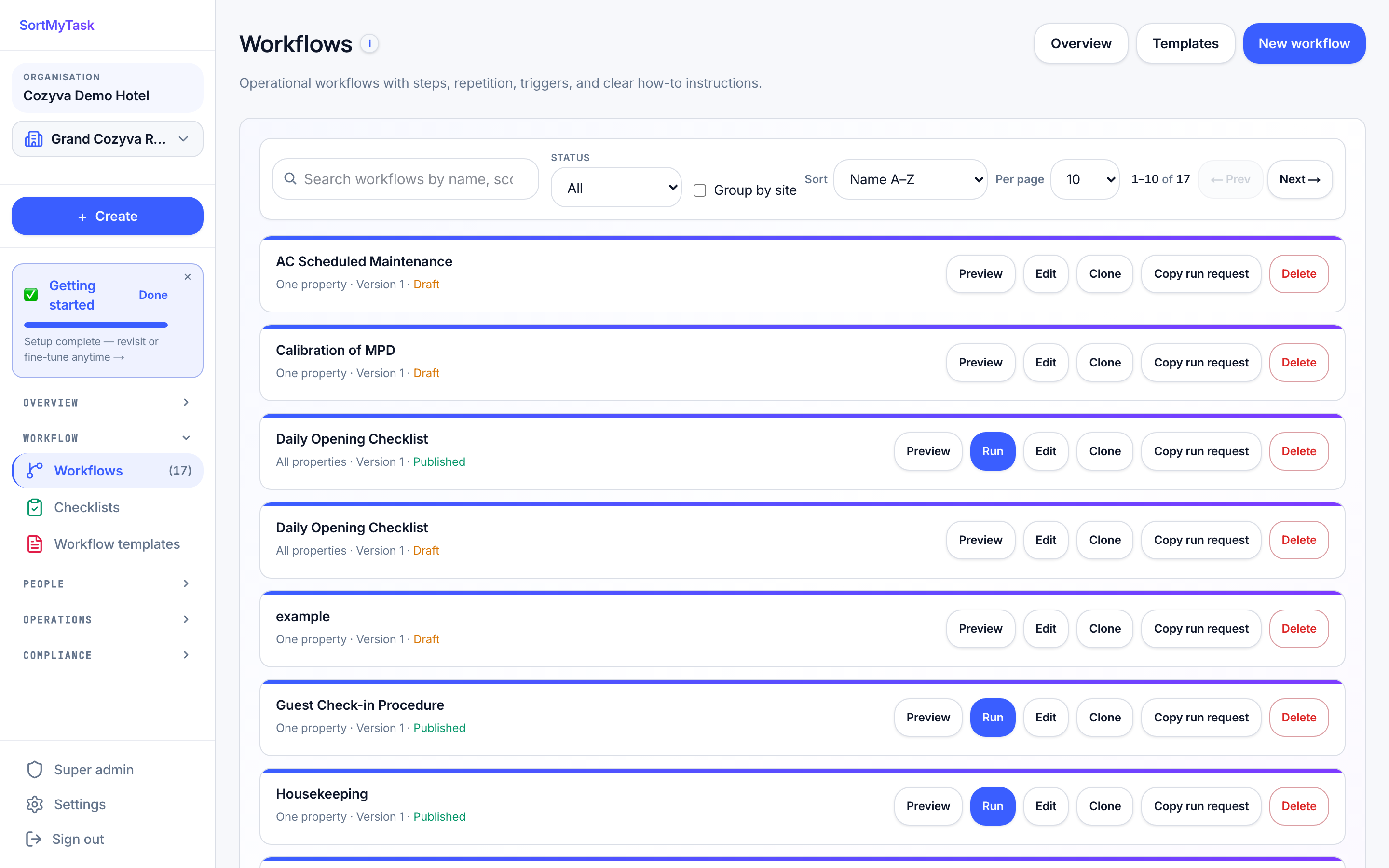
Decide once how things should run: "every morning at 7, lobby reset", "when a checkout is logged, get the room ready". From then on, tasks create themselves, already assigned to the right person. You stop being the reminder system.

See the visual builder →
The real SortMyTask workflows page: published routines that create their own tasks

Owners.
Ops. Supervisors. Floor.

Each role sees only what its job needs. Owners see the roll-up; ops leads see this morning’s gaps; supervisors approve and audit; frontline staff see today’s checklist on their phone. Same data, four lenses, zero noise.

/ OWNER

The roll-up& the trend

All your properties in one view. Weekly MIS score. Billing health. Approvals that need you. The full record when something feels off.

  • MIS · all properties
  • Billing · live
  • Audit · filter-aware
  • Trial · expiring soon
/ OPS LEAD

This morning’s ops

Pending approvals, today's duty chart, workflow audits, weekly score gaps. Set the roster, monitor the day.

  • Approvals · pending
  • Duty · today
  • Workflows · running
  • Score gaps · weekly
/ SUPERVISOR

The floor, accounted for

Approve, return with notes, mark complete. See your team's score band. Catch the SLA misses before they roll up.

  • My queue · approve
  • Team · score band
  • SLA · live
  • Notes · on the card
/ FRONTLINE

Today’s card stack

Just today's tasks, in order, with the checklist on the same screen. Tap to complete, upload a photo, hand it in. The mobile PWA fits in a pocket.

  • Today · ordered
  • Checklist · inline
  • Photos · one-tap
  • Mobile · PWA

Approve from the floor.

Works on any phone. No app store, nothing for IT to set up. Built for the supervisor who walks the floor and the employee who needs today’s checklist on a small screen. Approvals, photos, and checklist ticks all work with one thumb.

/01
Approve in one tapThe approval queue is one swipe. Tap approve, the next card slides in. Send it back with a note if something’s short. The task returns with your note, so the person knows what to redo.
/02
Photo evidence on the taskTap the checklist item, take the photo, it attaches to the task and the audit log. No more "where did that go?" over WhatsApp.
/03
No app store, no IT projectWorks on the phones your team already carries. Open the link, pin it to the home screen, and it behaves like an app from then on.
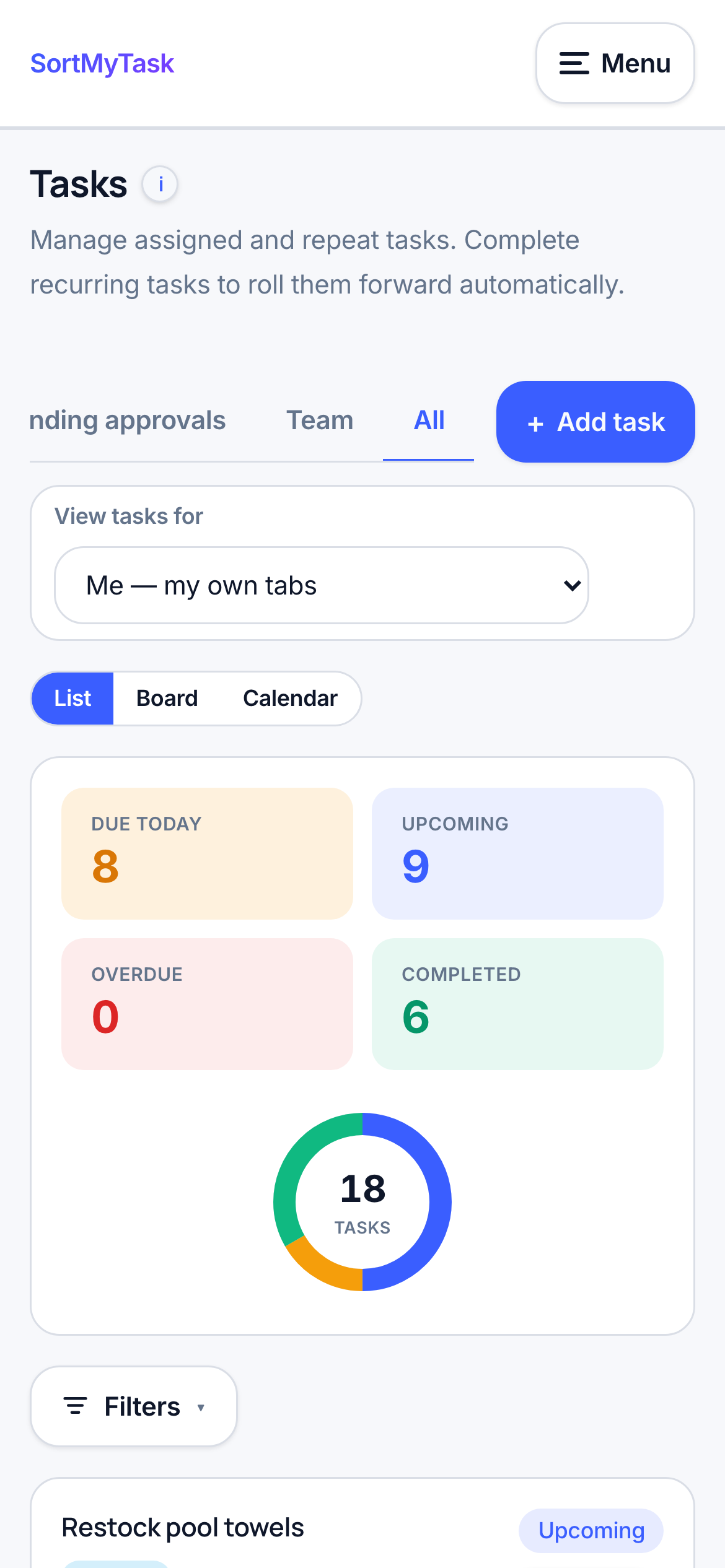
The real SortMyTask task list on a phone
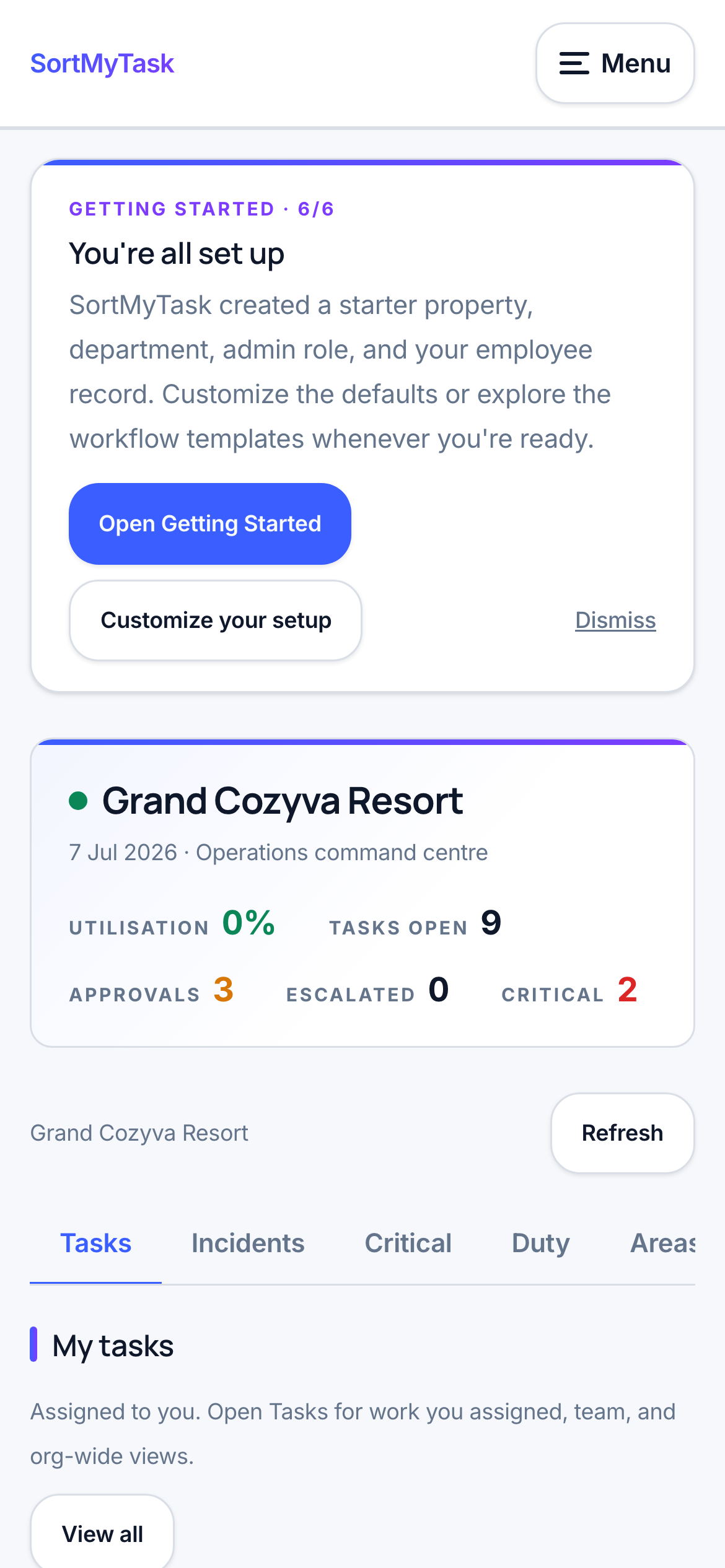
The real SortMyTask dashboard on a phone

Built on the parts
that don’t break.

The boring stuff, done properly: your data stays yours and stays separate, every action is on the record, billing works the way India actually pays, and everything runs from a phone. If your IT or finance person has questions, this section is for them. No fake integration logos.

SupabasePostgres · auth · RLS
RazorpayINR billing · UPI
VercelGlobal edge · cron
PWAInstall on any phone
Multi-tenantRow-level scoped
RBACGranular · per module
Audit logEvery action
CSV importEmployees · roles
Workflow cronUTC-aware · tenant-tz
WebhooksRazorpay · custom
Brand themes3 industry skins
Trial · 14 daysNo card required
You know the Monday meeting where supervisors rebuild last week from WhatsApp screenshots? That meeting disappears. The score is simply there, final and accurate, and the conversation moves to the week ahead.
The Monday morning testThe first thing that changes in week one
INR · NATIVE14-DAY TRIAL · NO CARDAUDIT LOG · ONMULTI-TENANT

₹99 per unit,
per month.

One unit = one room (hotels), one bed (hospitals), or one revenue-generating unit (general ops). Bring 10 supervisors or 500, the price doesn’t change. Trial is real: 14 days, no card.

Trial

Full product, all modules, no limits. 14 days, no card required. Onboard a property, run a workflow, see the Monday score.
Free· 14 days
  • Everything unlocked
  • Up to 5 locations · 50 employees
  • Visual workflow builder
  • Weekly scores, finalised automatically
  • Works on any phone
Start free

Enterprise

For groups above 100 units, with compliance, custom workflows, or single-tenant isolation needs. Annual contracts.
Custom
  • Everything in Standard
  • Your own private, isolated database
  • Workflows built with you, for your SOPs
  • Full activity history · 7 years
  • A named person who knows your account
  • In-person onboarding workshop
Talk to us

Run the way you wrote it.
From day one.

Add your first location, set today’s duty chart, and watch the day run itself. 14-day trial, no card. And if it doesn’t fit, there’s a 60-day money-back guarantee after you upgrade.

No card to start. 60-day money-back guarantee after you upgrade. Cancel any time, export everything.

The real dashboard, at 9:15 AM on a Wednesday.

REAL SCREENSHOT · DEMO DATA · LIVE
app.sortmytask.com / dashboard
The real SortMyTask dashboard: today's tasks, approvals, and department progress